Galaxy S II and email encryption

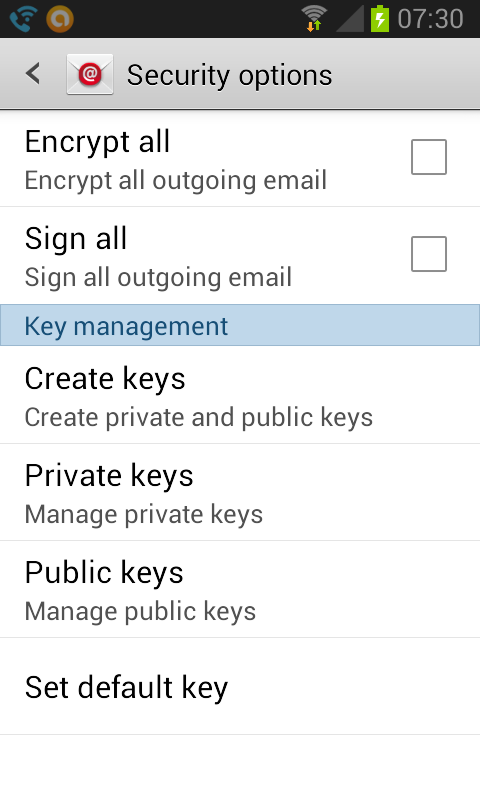
During the course of setting up some non-GMail accounts on my SGSII (running Andriod 4.1.2), I discovered the security options in the stock email client (not the GMail client). It lets you select whether to encrypt and/or sign all email, generate and manage secret/private keys and even import them.

I don’t know if this is a stock Android email client, or a stock Samsung TouchWiz client and as far as I could tell with some quick searching, the encryption bit isn’t mentioned anywhere that I could find with about 15 minutes of Google-ing.
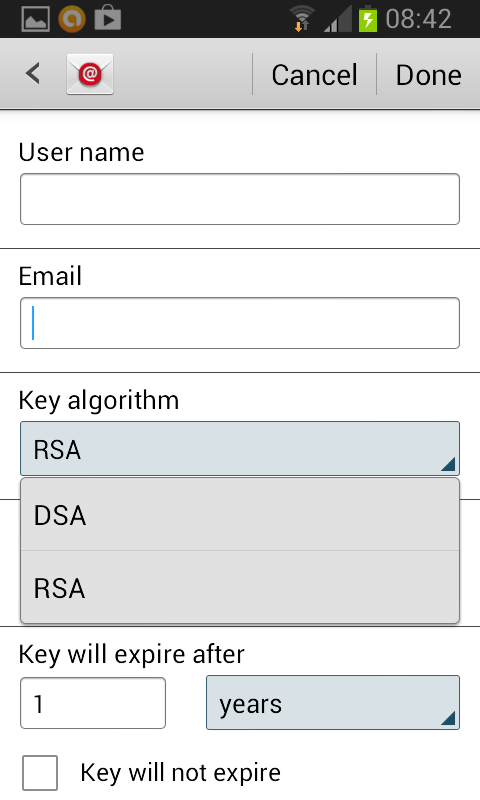
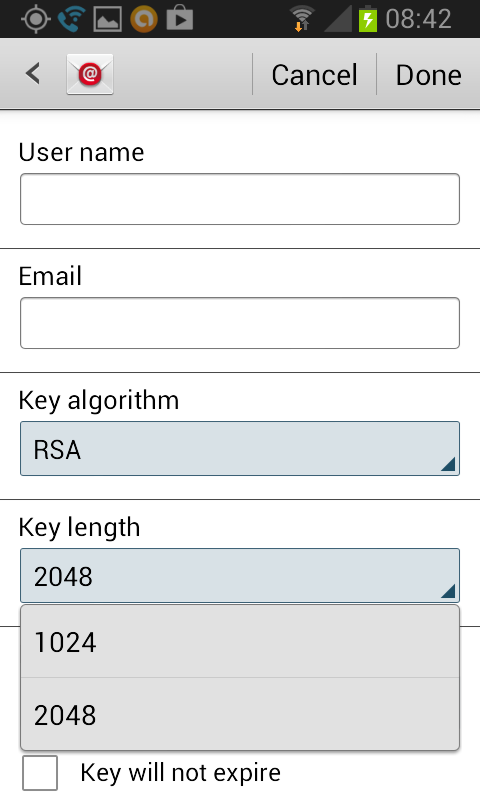
I did some experimenting starting with generating a public/private key pair. The key creation dialogue lets you create RSA keys that are 1024 or 2048 bits, or 1024 bit DSA keys. So it looks like something PGP or GnuPG-ish.
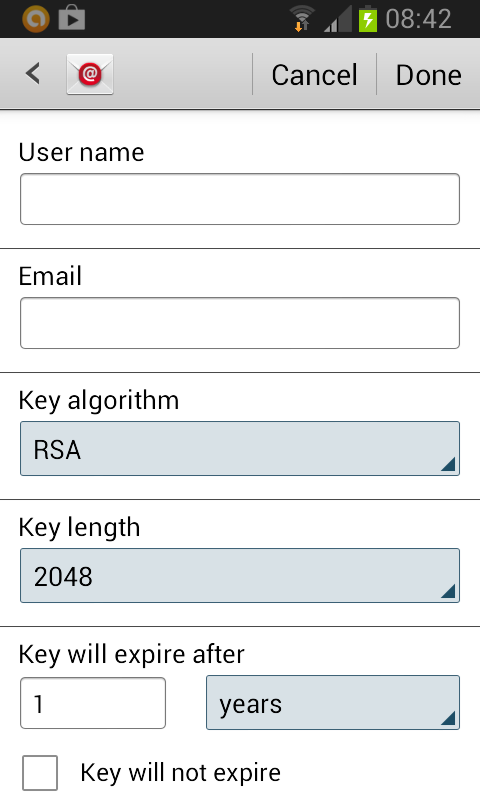
Android Email Key GenerationAndroid Email Key Algorithms
Android Email Key Length 

There’s an option to import a key, but it doesn’t let you select a location or file to import from, so it must be looking in some hardocded location.

Exporting the public key I created dumps an ASCII-armoured PGP  file into /storage/sdcard0/openpgp/export with a BCPG v1.45 version identifier

-----BEGIN PGP PUBLIC KEY BLOCK-----
Version: BCPG v1.45

Some Google searching suggests the Bouncy Castle Crypto APIs as a likely candidate for this. Their libraries include APIs for OpenPGP. So it looks like I should be able to import my existing GnuPG keys and use them to encrypt/sign my emails with this client. That will be my homework for the next post.

Second week of the month

The second week of the month seems to be a very popular week for having activities and meetings. Pretty much all the regular meetings I go to happen during the second week of the month. My weeks end up looking something like this

  • Nothing
  • MeetingMeetingMeetingMeetingMeeting
  • Nothing
  • Nothing

That’s only the regularly scheduled things too. It’s also a very popular week for non-scheduled events (at least the ones I’m interested in).

Makes for some hectic weeks sometimes.

Future events, I think I’m going to have to insist that you spread yourselves out throughout the month.

TS Chantal 2013

Looks like we’ll be in store for a rainy and windy weekendand start to next week thanks to Tropical Storm Chantal. As of today’s 8PM update, this is what the forecast track looks like.

Tropical storm Chantal 8PM EDT forecast track July 9, 2013

As long as the weather is good for the 19th, I’ll be happy.

Mystery magazine subscription

A copy of Redbook magazine appeared in the mailbox yesterday, addressed to me and indicating a 2 year subscription on the address label. Not even a sample “Subscribe to me!” copy.

It wouldn’t have been the first time something strange has appeared in the mailbox. Why I would subscribe to Redbook, I have no idea. I certainly didn’t subscribe to it intentionally and it definitely doesn’t have anything of interest to me.

I logged into Redbook’s customer service part of the website and found that I did indeed have a 2 year subscription with no balanace due, but no indication of who subscribed me. Since there was no point in keeping a magazine that’s just going to go straight into the recycling bin, I decided to cancel the subscription. The site told me the subscription was placed through some agent and that it would be canceled, but that I would need to go through the agent to pursue a refund.

Still no idea where it came from.

Fedora + Epson V200 scanner

Getting my Epson V200 scanner to work with Fedora has, in my experience, been kind of hit and miss with each version. Managed to get it to work a few years ago with Fedora 8, and then it stopped working again for a while with subsequent upgrades.

With Fedora 18, I managed to get it to work again installing a couple of iscan-* packages, but with the upgrade to Fedora 19, only the iscan-firmware package was left, with no evidence of the other iscan package I thought I had installed.

A little bit of searching got me the packages I needed to install though.

  • Install iscan-firmware and sane-backends from the Fedora repos
  • Find the driver and software for your Epson unit at http://download.ebz.epson.net/dsc/search/01/search/searchModule. In my case I was looking for the Epson V200 Photo scanner software and downloaded these:
    • iscan-2.29.1-5.usb0.1.ltdl7.x86_64.rpm
    • iscan-data-1.23.0-1.noarch.rpm
    • iscan-plugin-gt-f670-2.1.2-1.x86_64.rpm
  • Install in this order
    • iscan-data-1.23.0-1.noarch.rpm
    • iscan-2.29.1-5.usb0.1.ltdl7.x86_64.rpm
    • iscan-plugin-gt-f670-2.1.2-1.x86_64.rpm

The order of the last two packages (iscan and iscan-plugin-gt-f670) may not matter, but iscan-data needs to be installed before the other two. After that, I was able to scan again by running iscan at a terminal window.